Turn more leads into signed jobs.
Texts and calls in one inbox, one ranked list of who to chase next, and quotes your customers can sign and pay a deposit on from their phone.
- Texts, calls and voicemails from your business number in one shared inbox
- AI reads each thread (hot, cooling or at risk) and drafts the next reply; nothing sends until you tap Send
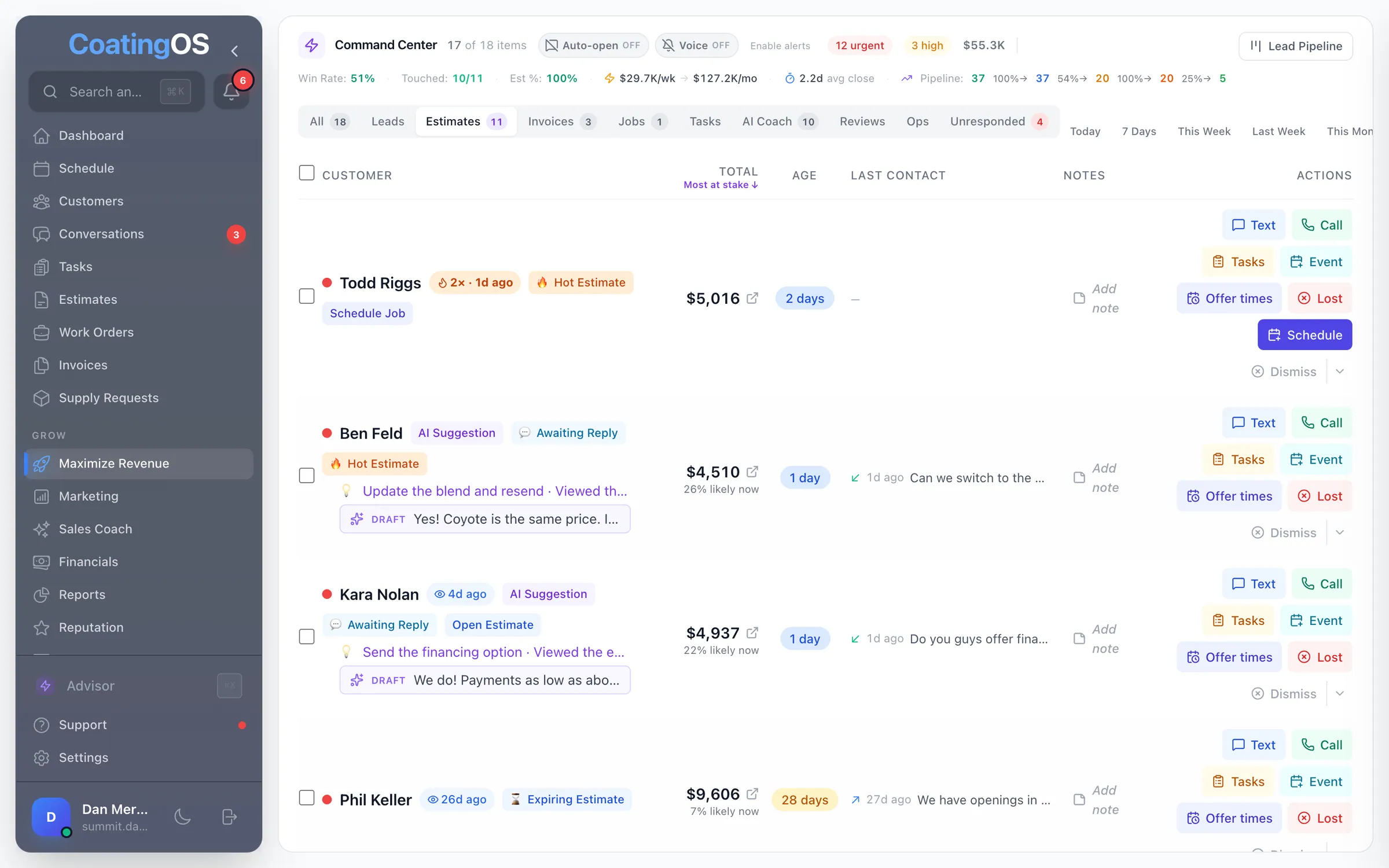
- The Command Center puts your leads, quotes, deposits and invoices in one list, and ranks leads and quotes by the money at stake
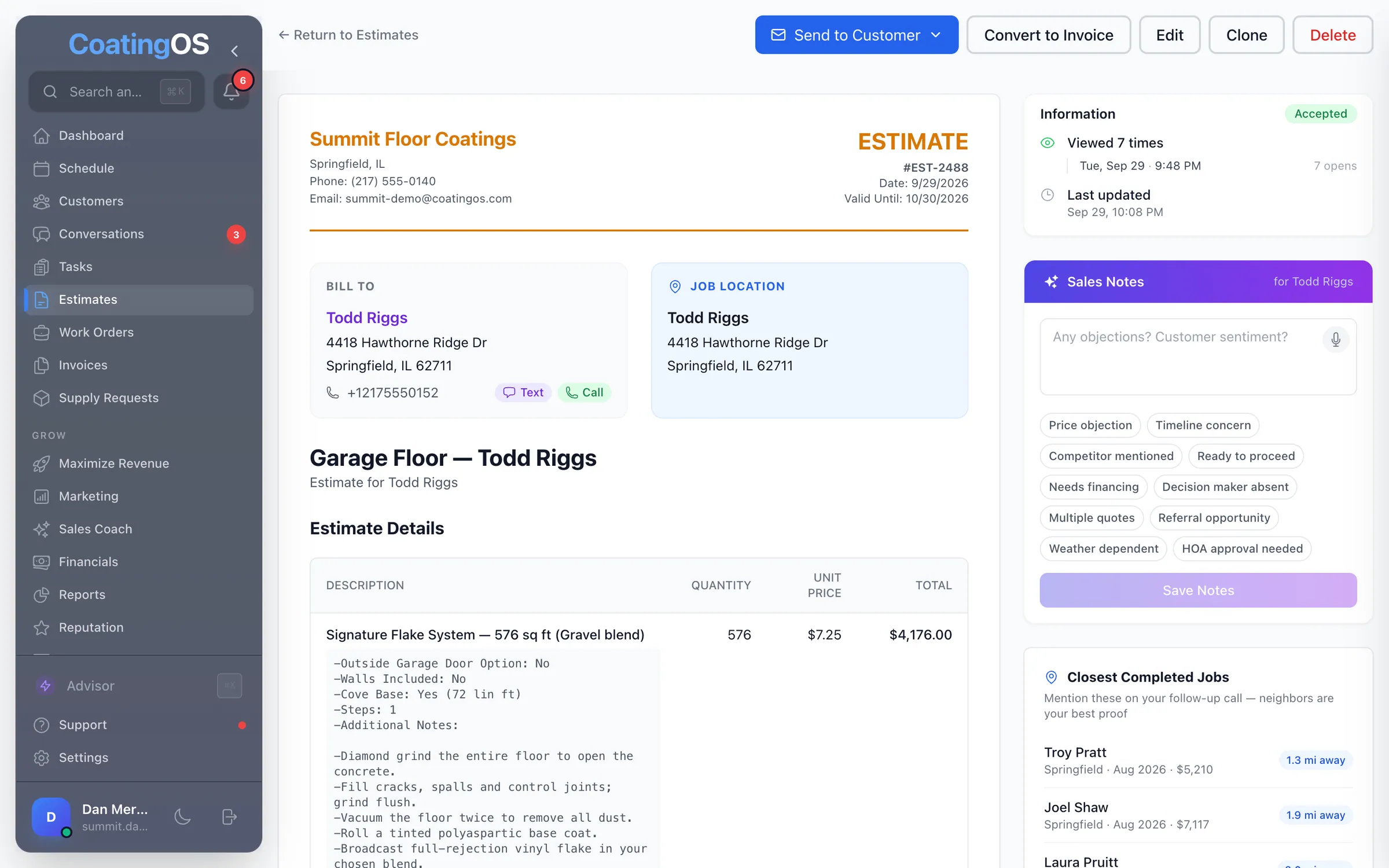
- Quotes with options and deposits that customers sign online; accepting creates the job
- An alert the moment a customer opens a quote, and again when they come back to it
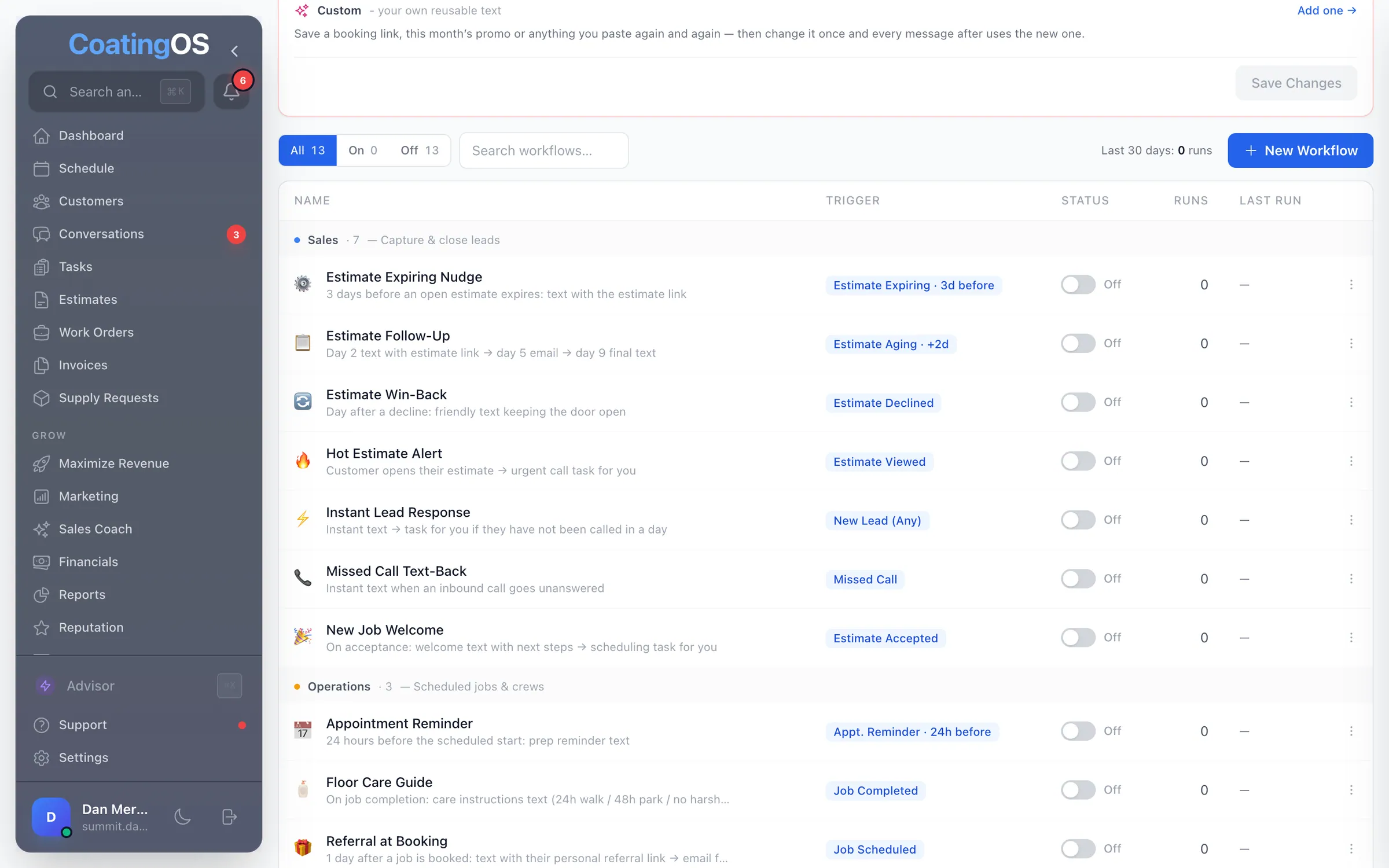
- Switch on follow-up texts for quiet quotes, missed calls and new web leads
Built by a floor coater with 2 crews

What it looks like in CoatingOS today.
Taken from the live app with a demo company's data.

All 109 Sell features.
Switch on means it's ready, and it runs only while its switch is on. Connect first means it needs an account hooked up, like your bank or Square. Texting and calling run on your CoatingOS number and prepaid credits.
Inbox and texting14
- Shared inbox
Customer texts, calls and voicemails in one shared team inbox
- Texting with photos
Text customers and trade photos from your business number
- Smart inbox filters
Unread, needs reply, new leads, hot, at risk, starred and stage
- Search every message
Search inside texts and call transcripts, then jump to the line
- Quick replies
Type a shortcut like omw, press Tab, and a ready reply fills in
- Delivery status
See which texts were delivered and which bounced, and why
- Opt-out protection
STOP replies and email unsubscribes are honored on every send
- Auto-detect details
Spots an address, email, name or visit time; save it in a tap
- Live presence
See which teammate has a thread open before you reply
- After-hours auto-replySwitch on
An instant text back to anyone who texts after hours
- Spam, archive and block
Mark spam, archive a thread or block the number, no reply needed
- Customer panel
Contact info, tags, tasks and notes beside every conversation
- Inbox scoreboard
Speed to lead and call answer rate at the top of the inbox
- Email sender settings
Your company name on emails; replies go to your own email
Phone system10
- Local business number
Pick a local number by area code once your texting registration is filed
- Texting registration
File your carrier texting registration and track each step
- Call routing
Ring several phones at once, on a schedule or while clocked in
- Browser calling
Call customers from your computer on your business number · Outbound calls
- Call recording
Record and transcribe calls; play them back in the thread
- Voicemail
Your own greeting; voicemails land in the caller's thread
- Missed-call text-backSwitch on
Texts a caller back seconds after a call you miss
- Number porting
Bring your current number over with a guided, checked request
- Block a number
Block a spam number; its calls, texts and form fills stop
- New callers saved
New callers become contacts, named from caller ID
Command Center8
- Prioritized action queue
One ranked list of leads, quotes, deposits, invoices and jobs
- Most-at-stake sort
Sort leads and quotes by dollars times their chance to close
- Revenue funnel
Win rate, booked $ per week and the lead-to-invoice funnel
- One-tap actions
Text, call, log the call, add a task or event, or mark lost
- Catch-up walk
Walks you through unanswered texts, one thread after another
- Live text pop-ups
A customer's new text opens on screen so you can answer fast
- Hot quote flags
Flags quotes opened again and again, never opened, or near expiry
- Missed calls to return
Missed calls and voicemails stay on the board until returned
Leads and pipeline8
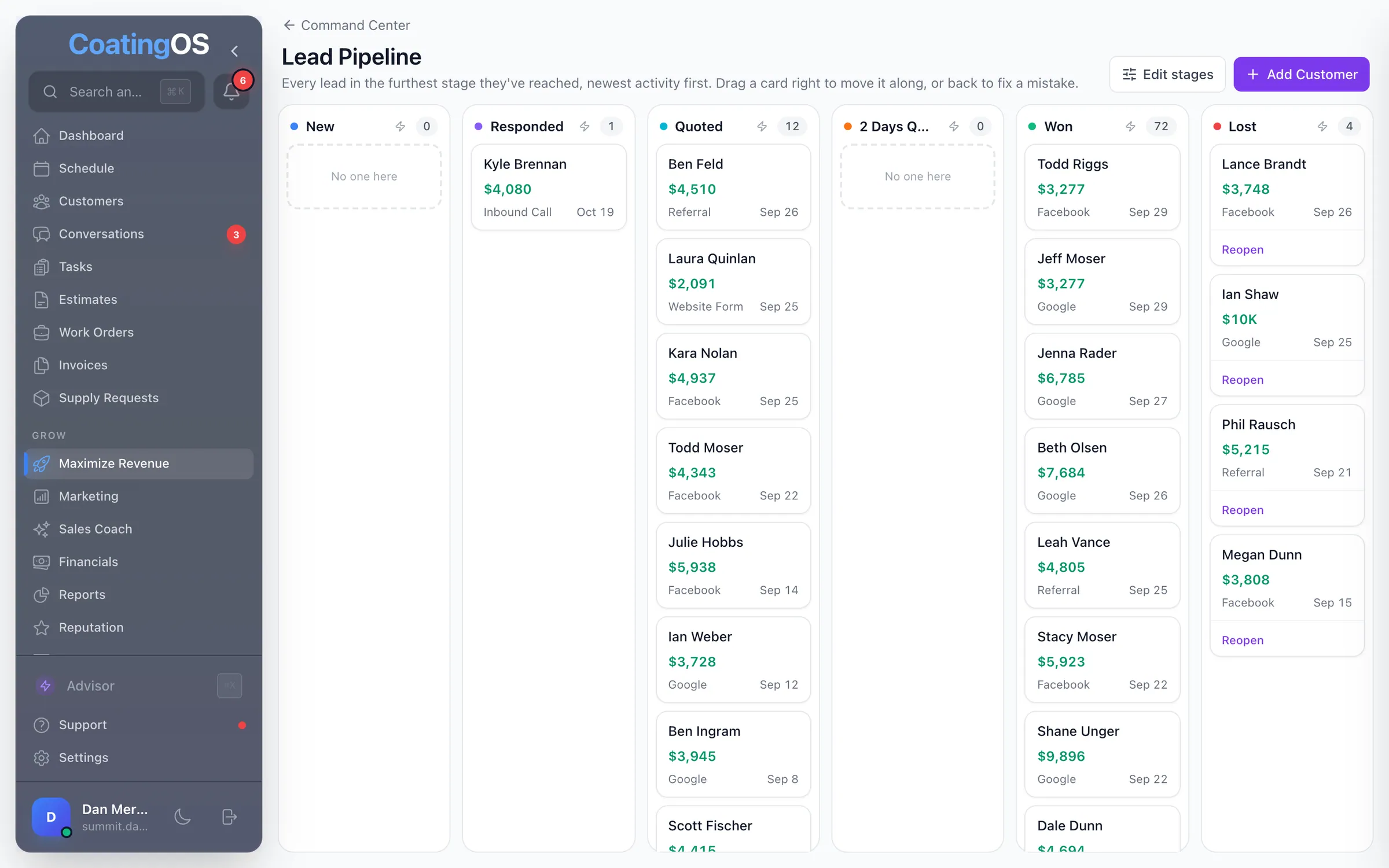
- Lead pipeline board
Drag leads through stages you name, from New to Won or Lost
- Automatic stage moves
Replies, sent quotes, jobs and invoices move the card on their own
- Stage automationsSwitch on
Moving into a stage can start a workflow you've switched on
- Lead intake
Form, price-estimator, Facebook lead-ad, call and text leads land here
- Returning customer match
A repeat inquiry attaches to the customer you already have
- Lost reasons
Pick why a quote was lost in one tap; reasons roll into a report
- New-lead alerts
Alerts when a web or Facebook lead arrives and if it waits 15 min
- Instant lead replySwitch on
Switch on an instant text to new web, Facebook and text-in leads
Booking estimate visits6
- Offer timesSwitch on
Two visit times that fit your calendar and the drive between stops
- Book in one stepSwitch on
Book the time the customer picked, with no double-booking
- Visit rules
Set who runs visits, their hours, visit length, area and days off
- Late-arrival check
Warns when a visit booking looks tight or is likely to run late
- Booking confirmations
A text and email confirm each appointment you book
- I'm out todaySwitch on
Mark yourself out; reschedule texts with new times come drafted
Estimates21
- Estimate builder
Price-book lines, discounts, tax, tags and status tabs
- Satellite measuring
Outline a driveway, patio or garage on satellite view for sq ft
- Floor plan sketchCoater-only
Draw the floor wall by wall for sq ft, gallons and tape marks
- Sketch-to-estimateCoater-only
Snap or text a photo of a paper sketch; get a draft quote
- Good, Better, BestCoater-only
Tiered packages priced by sq ft and the slab's condition
- Optional add-ons
Customers tick upgrades and extras; the total updates as they pick
- Deposits
Ask for a percent or flat deposit on any quote
- Consumer financingConnect first
Monthly payment plans from Hearth or Wisetack on the quote · Needs Hearth or Wisetack
- Nearby jobs
Your closest finished jobs, to mention on the follow-up call
- Open tracking
See when and how often the customer opened their quote
- In-person signatures
The customer signs on your screen from the estimate page
- Terms and warranty
Reusable terms, warranty text and helpful links on every quote
- Plan to quoteCoater-only
Turn a drawn floor into a priced quote: system, blend and add-ons
- Voice estimate
Talk through the job on site; review the AI's draft quote later
- Price book
Your services and products with prices, in the order you sell
- Line order
Drag quote lines into any order while building or editing
- One price per line
Show one price per line instead of quantity × unit price
- Estimate date
Change the date on a quote, never to a future day
- Margin check
See a quote's estimated margin against your target before sending
- Quote alerts
Alerts when a quote is opened, re-opened, accepted or declined
- Quote follow-up textsSwitch on
Switch on follow-up texts and an email for quotes that go quiet
What your customer sees5
- Branded estimate page
A phone-friendly quote with your logo, reviews and videos
- E-sign and accept
Customers sign and accept online, and the job is created for you
- Pay the deposit onlineConnect first
Customers pay the deposit by card, bank transfer or PayPal · Needs Square or PayPal connected
- Decline with a reason
Customers who pass pick a reason, so you know why
- Our work near you
The quote shows your finished projects closest to their home
Tasks and automations13
- Tasks
To-dos with priority, assignee, due time and customer
- WorkflowsSwitch on
Automations that start on a lead, missed call, quote, job or invoice
- Workflow stepsSwitch on
Text, email, voicemail drop, wait, task, team alert, tag, stage
- Conditions and filtersSwitch on
Branch on a reply, tag, time of day or quote size; filter by service
- Ready-made workflowsSwitch onCoater-only
Templates for lead replies, quote follow-up, reviews and floor care
- Workflow safety checks
A setup checklist, sample preview and test text before go-live
- Run history
See who's in each workflow, why a run stopped, and stop any run
- Follow-up safeguards
Stops when they reply, accept or pay; max one automated text a day
- Post-job check-in callsSwitch on
A call-the-customer task 6 or 12 months after each job
- Appointment reminders
Customers get a reminder text and email 1 and 2 days ahead
- Text, email or both
Pick text, email or both for quotes, jobs, invoices and receipts
- Message templates
Edit the wording of quote, invoice, reminder and receipt messages
- Custom values
Save a booking link or promo once; templates, workflows and blasts use it
Sales Coach12
- Call grading
Sales calls scored on a coating rubric you can change · Calls on your CoatingOS number
- Visit recordingSwitch on
Record estimate visits on the phone for a transcript and grade
- Pre-visit brief
A short sales brief on the phone about an hour before each visit
- Post-call card
One win and one fix after each graded sales call · Calls on your CoatingOS number
- Mined winning lines
Approve lines from your own won deals for the AI to reuse
- Company playbook
Write the pricing, objection and voice rules the AI follows
- Habit tracking
Follow-up, callback and discount habits, with dollars at stake
- Concession ledger
Discounts get a reason chip; unexplained ones are tracked
- Deal leak alerts
Flags quotes with no follow-up and visits that never got a quote
- Visit debrief
Log how each estimate visit went in a few taps
- Calls worth hearing
Up to three calls a week worth a listen, with notes to the rep · Calls on your CoatingOS number
- Skill of the month
Pick one sales habit to fix each month and track the change
Customers12
- Customer records
Contact info, job sites, notes, files, tags, quotes, jobs, invoices
- Customer history
Texts, calls, quotes, jobs and payments in one running thread
- Search and filters
Find anyone by name, phone or email; typos in names still match
- Extra phones and addresses
Several numbers and job sites per customer; pick which to text
- Duplicate cleanup
Find duplicate customers and merge them, history and all
- How they found you
The ad, campaign or web page each online lead came in on
- Property intelCoater-only
County home facts, value and your garage jobs nearby
- Tags
Tag customers; adding or removing a tag can start a workflow
- Not-a-lead flag
Keep vendors and wrong numbers out of your lead and close rates
- Export and bulk actions
Download customers as a CSV; change source or delete in bulk
- Lead sources
Set each customer's lead source from your own list, even in bulk
- Call and text buttons
Call or open a text thread from the customer list, tasks and more
Run the whole business from one place.
A floor coater with 2 crews created CoatingOS specifically to save you time and increase your revenue and profit. $278/mo for every feature on this site, your website included. Unlimited users and a 7-day free trial.