Get paid, and see what every job really made.
Invoices with online pay and payment plans, a bank feed that sorts itself into a P&L, and a dashboard that shows each day whether you’re ahead of your goal.
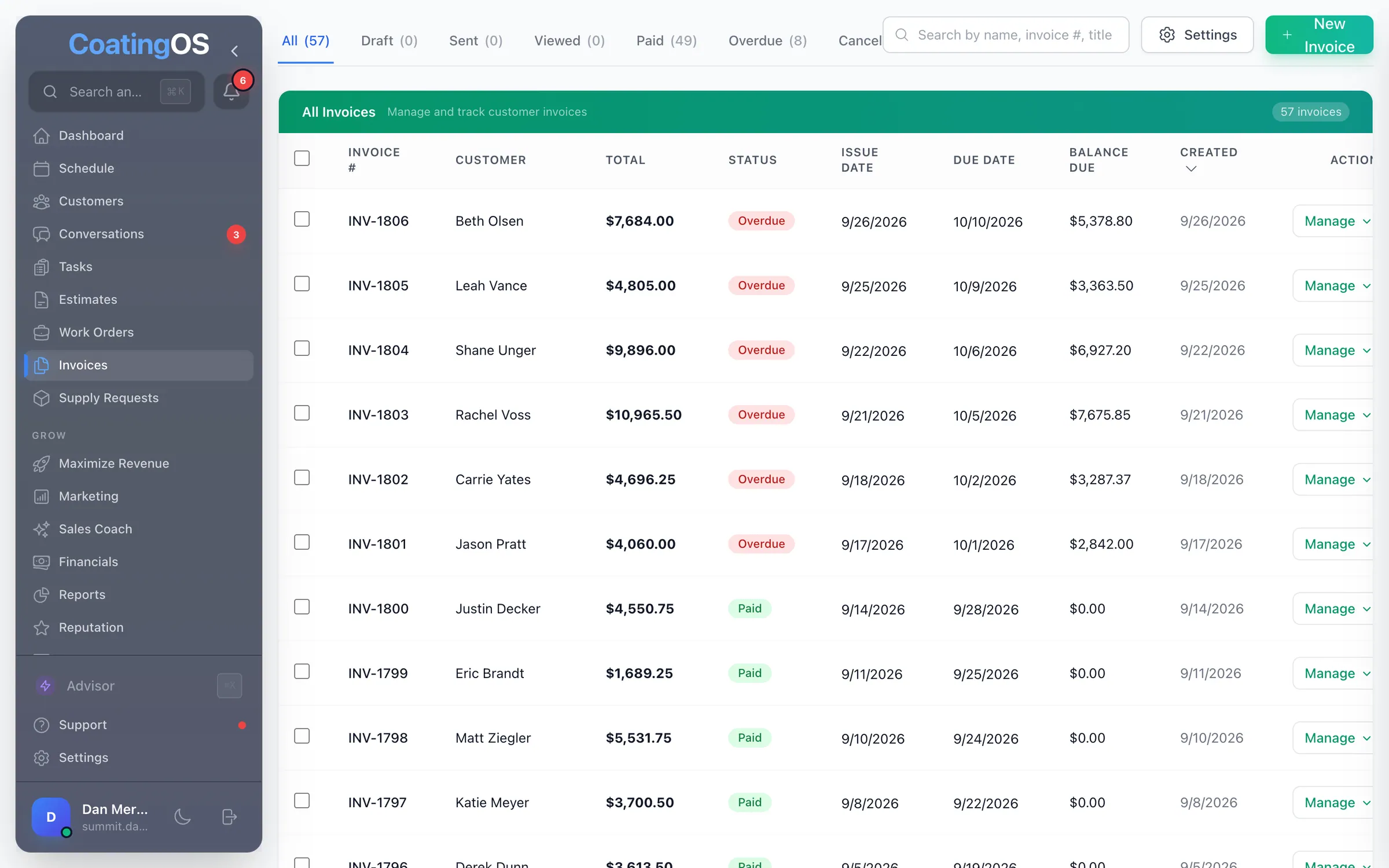
- Customers pay online by card, bank transfer, Apple Pay or Google Pay through your own Square, or with PayPal
- Split a big job into 2 to 12 payments, with a pay link sent on each due date
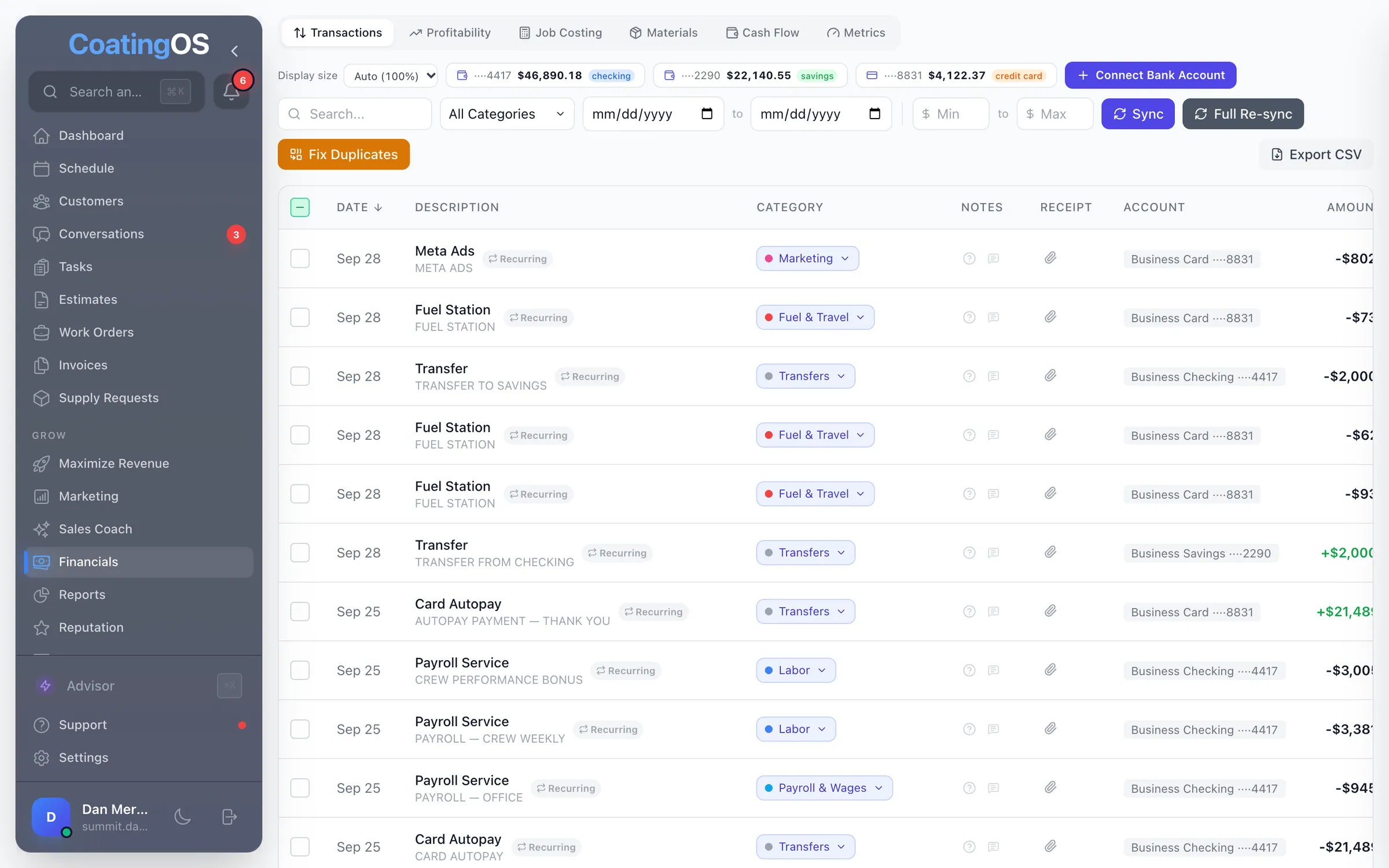
- A P&L from your invoices and bank feed, sorted into contractor categories
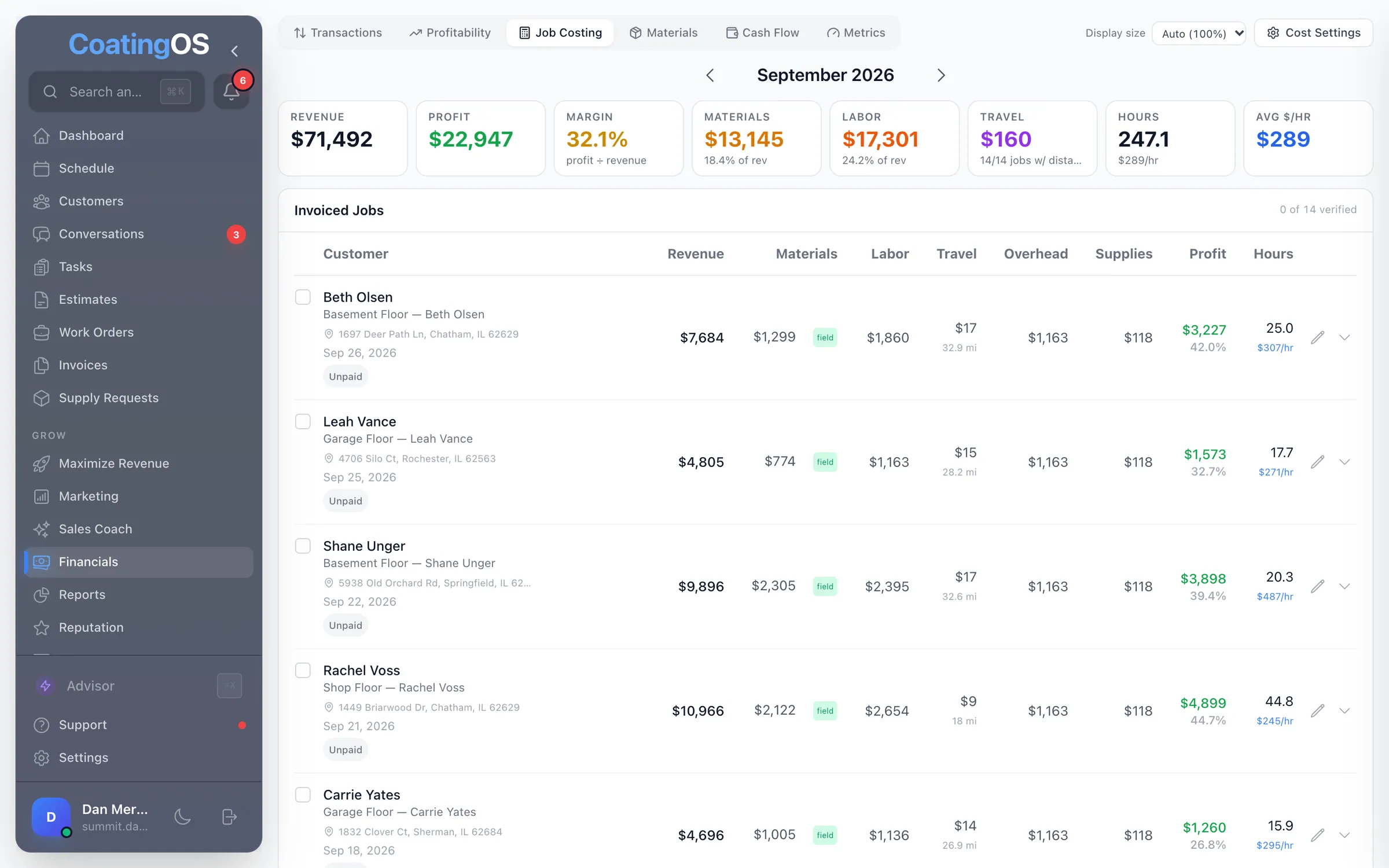
- Job costing: materials, labor, travel and overhead taken out of each job
- Set a year goal once; the dashboard shows each day whether you’re ahead or behind
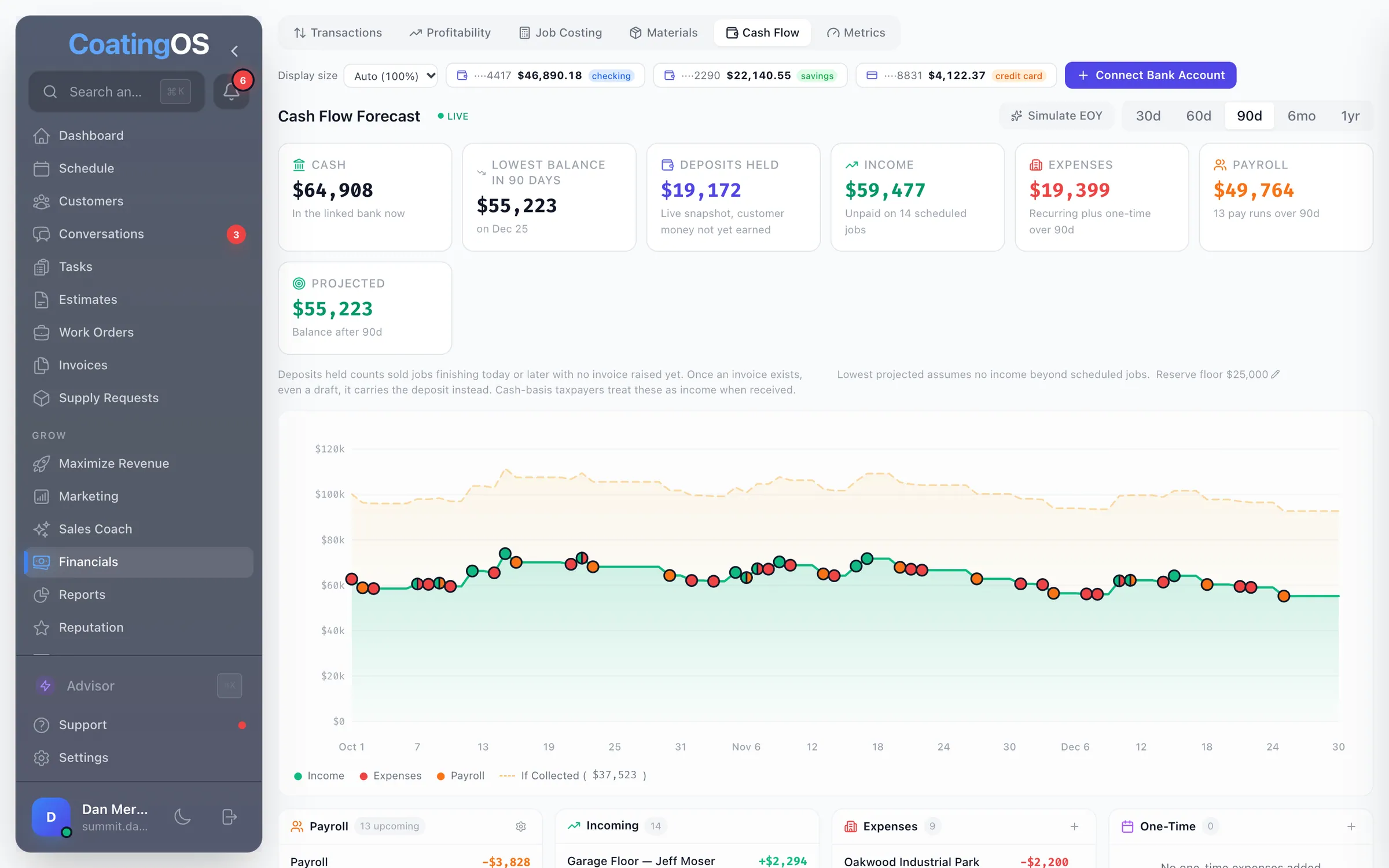
- Cash-flow forecasts up to a year out, and 12 ready-made reports
Built by a floor coater with 2 crews

What it looks like in CoatingOS today.
Taken from the live app with a demo company's data.
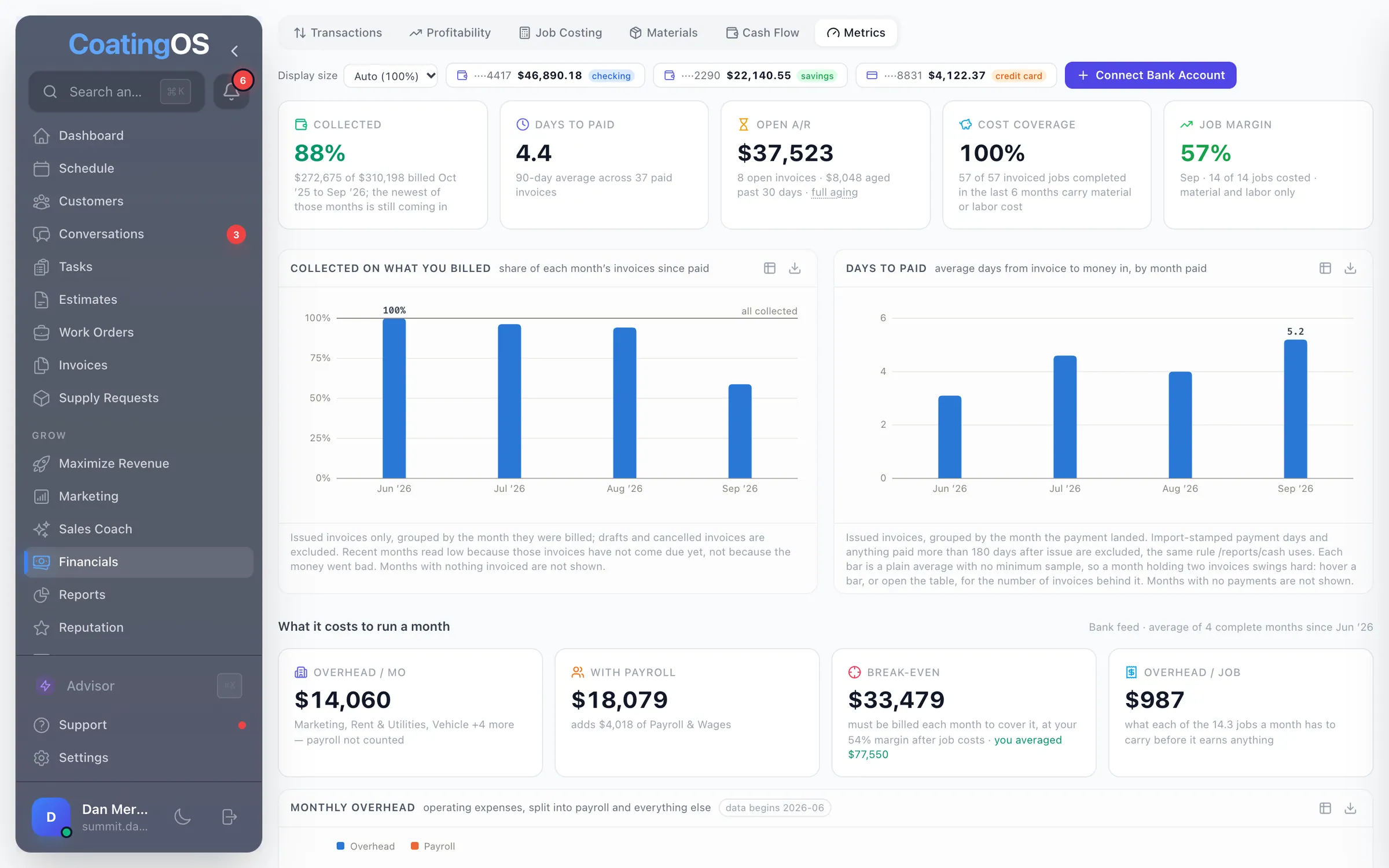
All 79 Profit features.
Switch on means it's ready, and it runs only while its switch is on. Connect first means it needs an account hooked up, like your bank or Square. Texting and calling run on your CoatingOS number and prepaid credits.
Invoicing10
- Invoices
Create, text or email, clone and track every invoice
- Job to invoice
Turn a finished job into an invoice with its lines, tax and deposit
- Record payments
Log check, cash, card, Venmo or Zelle payments on the day received
- Payment plans
Split a balance into 2–12 payments the customer pays from one link
- Installment reminders
A text or email with a pay link on each payment's due date
- Automatic late feesSwitch on
Add a percentage late fee once an invoice passes its grace period
- Invoice open tracking
See when and how often a customer opened their invoice link
- Overdue invoice follow-upSwitch on
Overdue invoices get a pay-link text, an email, then a task for you
- Invoice PDF
Download a branded PDF invoice that lists each payment by date
- Invoice defaults
Set Due on Receipt or Net days, invoice numbers and a default note
Getting paid13
- Online pay pageConnect first
Customers pay the balance, or the next installment, from their link · Needs Square or PayPal connected
- Card paymentsConnect first
Take cards on invoices and deposits through your own Square · Through your own Square account
- Bank transfer (ACH)Connect first
Customers pay from their bank account, with no card fee added · Through your own Square; US dollars
- PayPal and VenmoConnect first
A PayPal button, plus Venmo or Pay Later when PayPal offers them · Needs your PayPal business account
- Card processing feeSwitch on
Pass the card fee to the customer, shown before they pay
- Sales tax
Your tax rate on estimates and invoices, with tax-free lines
- Deposit tracking
See deposits held for unfinished jobs; get alerted when one is paid
- Apple Pay, Google PayConnect first
Wallet buttons on the pay page for customers paying by card · Through your own Square; Apple Pay shows in Safari
- Tips at checkoutConnect first
Customers can add a 10–25% or custom tip when paying an invoice · Invoice payments through Square or PayPal
- Check, Venmo, Zelle detailsSwitch on
Show who checks go to, plus your Venmo and Zelle, on each invoice
- Payment receipts
Customers get an email or text receipt when they pay
- Paid and viewed alerts
Get alerted when a customer opens or pays an invoice
- Bill in your currency
Invoices and pay pages in US or Canadian dollars, euros or pounds
Owner dashboard11
- Year goal pace
Ahead or behind your year goal today, in dollars, with what-ifs
- This week's target
What to book this week, and the jobs, leads and ad spend it takes
- Waiting on you
Quotes to chase, deposits, jobs to schedule or bill, past-due invoices
- Weekly bookings
12 weeks of new bookings against the pace your goal needs
- Crew calendar
Each crew's open days to Dec 31, next opening and dollars per month
- New leads scorecard
New leads, how fast you replied, who's still waiting, quoted and won
- Call outcomes
Each inbound call sorted: answered, AI receptionist, voicemail or missed
- Money in
Quoted, booked, invoiced and collected for the dates you pick
- Last 7 days
New leads, quotes, jobs, invoices and payments from the past 7 days
- Goals and grades
See which numbers are behind goal: reply speed, win rate and more
- Weekly goal on phone
This week's booked work against your weekly goal, on the phone
Job costing and crew pay9
- Job costing
Each job's profit after materials, labor, travel and overhead · Once your cost settings are saved
- Labor from clocked hours
Labor cost from the hours crews clock on a job and their pay rates · Needs each worker’s pay rate
- Mileage lookup
Fills in shop-to-job driving miles so travel cost is counted · Needs your shop address
- Crew pay and commissionSwitch on
Crew commission per job and pay by period, vs what hourly would pay
- Collection metrics
How much of your billing gets collected, how fast, and what's open
- Break-even and marginConnect first
Monthly overhead, what you must bill to break even, and job margin · Overhead comes from your linked bank
- Job profit card
A cost and profit card on each work order, same math as Job Costing · Once your cost settings are saved
- Quoted vs actual
Compare the margin you quoted with what the job actually made · For quotes built on the web
- Cost settings and kitsCoater-only
Set labor %, burden, gas, MPG, overhead and coating supply kits
Bank feed and books8
- Bank syncConnect first
Link business bank and card accounts so spending flows in · US banks, through Plaid
- Transaction feedConnect first
Search, filter, note and mark reviewed every bank transaction · Needs your bank linked
- Auto-categorizeConnect first
Sorts bank spending into categories and learns from your changes · Needs your bank linked
- Receipts and notesConnect first
Snap a receipt on your phone and attach it to the bank charge · Needs your bank linked
- Accountant exportConnect first
Export transactions and the P&L to CSV for your bookkeeper · Needs your bank linked
- Accountant login
A bookkeeper login for Financials that can flag questions
- Looks Off filterConnect first
Flags money in filed as an expense, or money out filed as revenue · Needs your bank linked
- QuickBooks OnlineConnect first
Send invoices and their customers to QuickBooks Online · One way, to QuickBooks Online (US)
P&L and cash11
- Profit and lossConnect first
Monthly or yearly P&L: invoiced revenue against bank spending · Spending comes from your linked bank
- Spending by monthConnect first
Each spending category by month, with YTD, % of revenue and last year · Needs your bank linked
- BudgetsConnect first
A monthly budget per category, with a bar showing how much is used · Needs your bank linked
- Recurring bill detectionConnect first
Finds bills charged the same amount on the same day each month · Needs your bank linked
- Tax set-aside
Estimated federal tax and what to set aside for the next payment · A rough federal estimate, not tax advice
- Financial Health ScoreConnect first
A 1–10 score from margin, spending, revenue swings and cash · Needs your bank linked
- Cash flow forecastConnect first
Day-by-day cash 30 days to a year out, from jobs, bills and payroll · Starts from your bank balance when linked
- Minimum cash warningConnect first
Flags the day projected cash drops below the minimum you set · Needs your bank linked
- Payroll simulationConnect first
Re-run a month's P&L with payroll at your target % of revenue · Needs your bank linked
- Leave months outConnect first
Click months off so partial months don't skew the year's totals · Needs your bank linked
- P&L scribblesConnect first
Pencil in a correction or move a cost to the month it belongs · Needs your bank linked
Forecasts and what-ifs4
- Month-end projectionConnect first
Project this month's P&L from invoices so far and scheduled jobs · Needs your bank linked
- Payday forecast
Projects each payday from scheduled jobs, pay rates and payroll tax · Needs pay rates and a pay day
- Year-end profit simulatorConnect first
See where the year lands: booked work plus the open days you fill · Needs your bank linked
- Year-end cash simulatorConnect first
See the cash you'll have Dec 31 if you fill your open crew days · Needs your bank linked
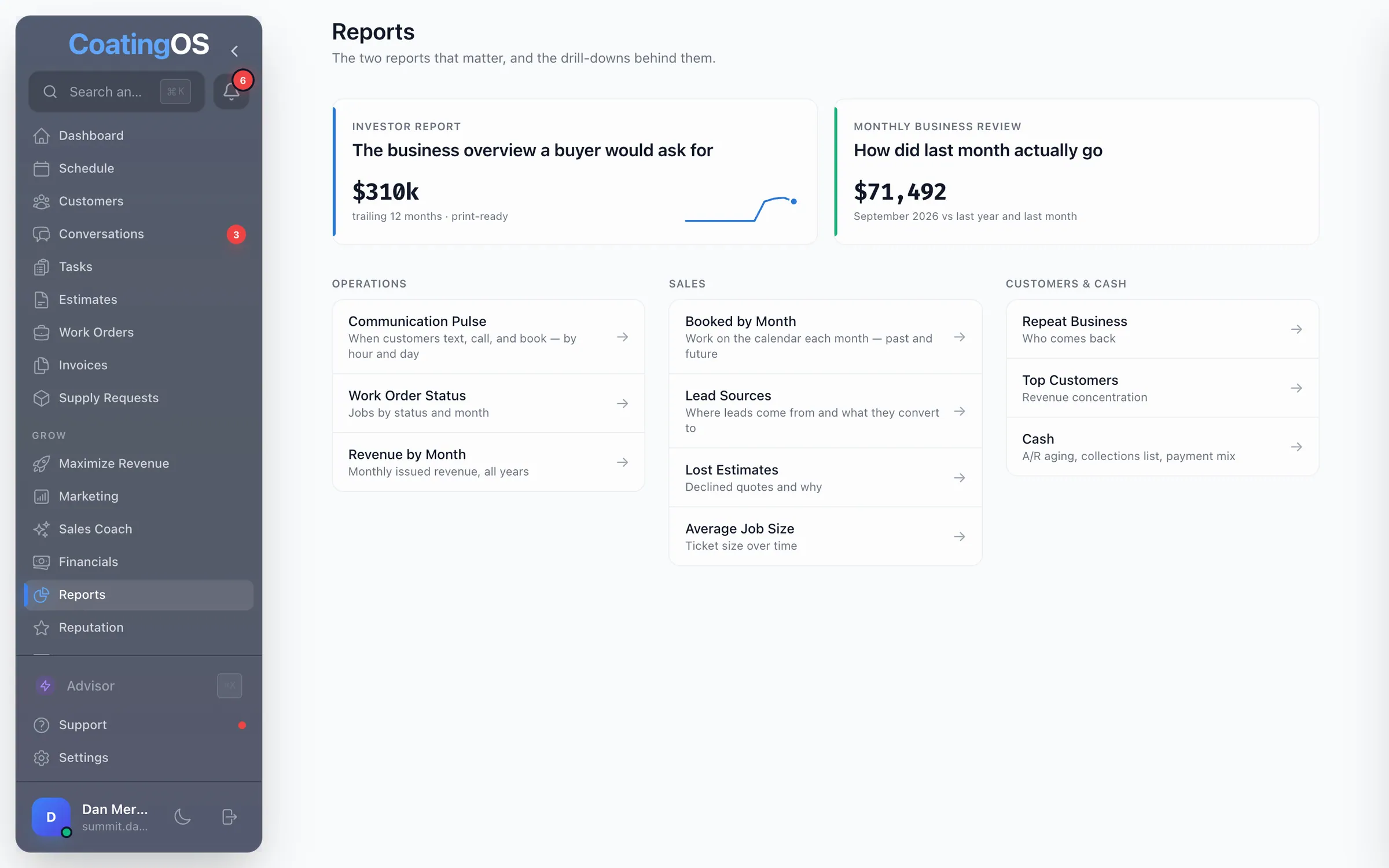
Reports13
- Investor Report
A printable business overview: growth, cash, leads and reviews
- Monthly Business Review
Any month vs last month and last year, and what drove the change
- Cash and Collections
Who owes you, how overdue, how fast you get paid, how customers pay
- Revenue by Month
Invoiced revenue every month, vs last year, and your best month
- Booked by Month
Work on the calendar each month, or between any two dates
- Lead Sources
Where leads come from and how many from each source booked a job
- Lost Estimates
Declined quotes, dollars lost by reason, and customers' own words
- Ticket Size
Median invoice by quarter, and your largest in the last 12 months
- Repeat Business
Share of revenue from customers who came back, by year
- Top Customers
Your 25 biggest customers and how much the top 10 bring in
- Communication Pulse
When leads arrive and customers text, call or accept, by hour
- Work Order Status
Jobs and dollars by status, and completed vs scheduled by month
- Tables and CSV downloads
Flip most report charts to a table or download them as a CSV
Run the whole business from one place.
A floor coater with 2 crews created CoatingOS specifically to save you time and increase your revenue and profit. $278/mo for every feature on this site, your website included. Unlimited users and a 7-day free trial.